
Bringing hiring inside the Howdy App
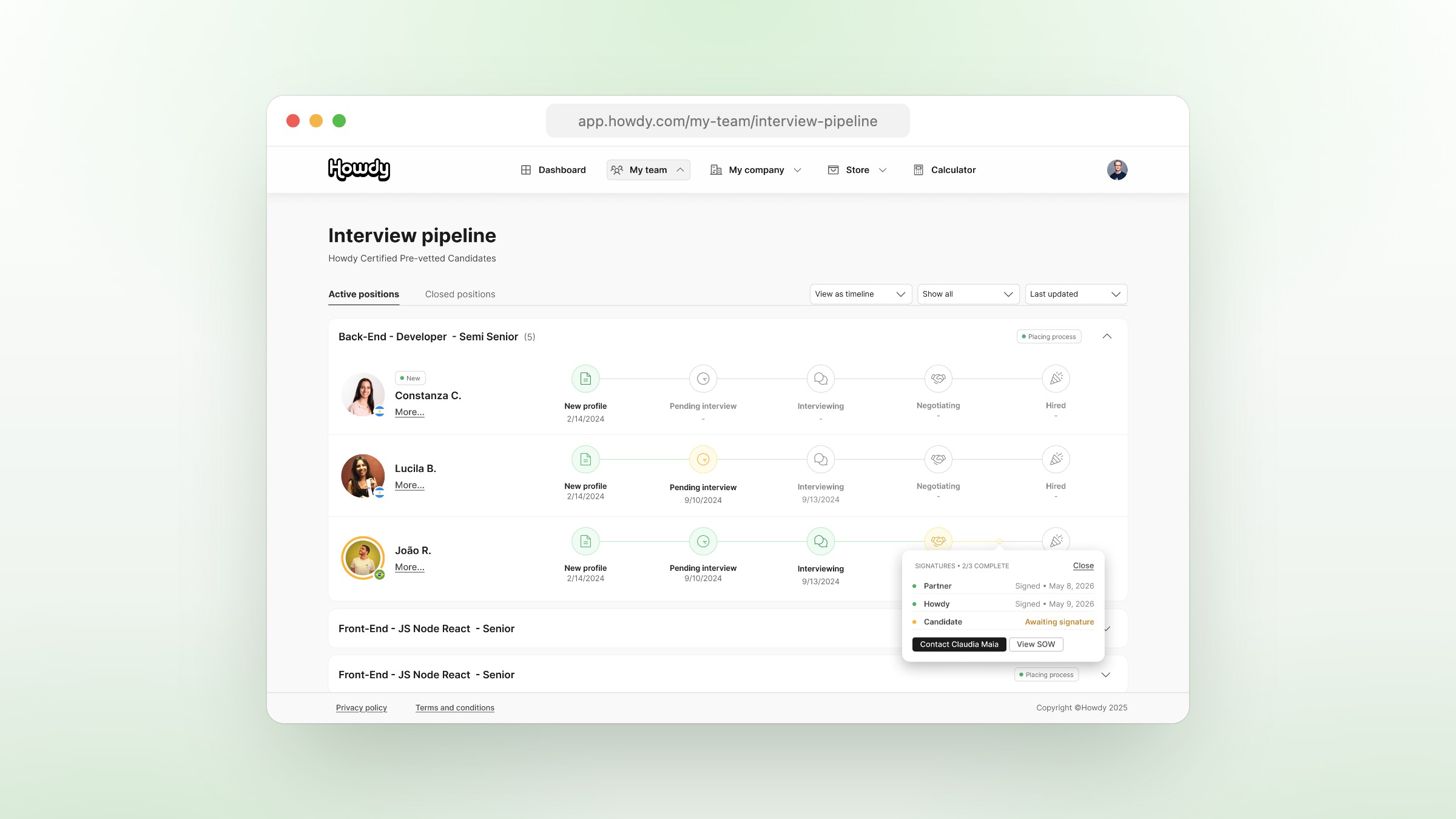
For years, the moment a Howdy partner found the right engineer, the work moved outside the platform. Hires were finalized over email threads with an account manager, paperwork shuttled back and forth, and signatures chased down by hand. It worked — but it wasn’t the experience we wanted for the most important moment in the relationship.
Today we’re shipping In-App Hiring: a single, end-to-end flow that lets you go from “this is the one” to a signed agreement without ever leaving Howdy.
Why We Built It
Hiring an engineer should feel like the easiest thing you do that week. Instead, it often meant:
- Logging the decision in one place and the paperwork in another.
- Waiting on someone — your AM, a teammate, a signer in another timezone — before anything could move.
- Re-explaining context that the platform already had: the role, the rate, the engineer you’d just spent hours evaluating.
In-App Hiring closes that gap. The same recommendation you reviewed, the same engineer profile you read, the same commercial terms you negotiated — that’s what flows directly into the agreement. No re-keying, no parallel inbox, no “let me forward you the latest version of the SOW.”
How It Works, Step by Step
When you click Hire on a recommendation, you enter a guided flow that handles the entire path from intent to signature.
1. You’re Hiring [Engineer]!
The first modal opens with a clear confirmation of who you’re hiring and asks for the few details that turn an intent into a contract:
- The engineer’s desired start date.
- The engagement timeframe.
- Any notes you want your account manager to see.
That’s it. It takes under two minutes because the platform already knows everything else: the role, the rate structure, the engineer’s profile, your company on file. You don’t re-enter any of it.
2. Review Your Offer
The next screen is a clean, read-only summary of the offer: candidate, role, location, start date, and a transparent fee breakdown — take-home, benefits, Howdy fee. This is your last checkpoint before paperwork is generated. If anything looks off — a rate that doesn’t match what you agreed on, a date that needs to shift — your account manager is one click away.
A safeguard runs here in the background: if any of the underlying rates are zero (a sign that something didn’t sync correctly), the platform refuses to issue the SOW and notifies your AM to fix it before you ever see a broken contract. You won’t get stuck in a bad signing experience.
3. Sign — Directly Inside Howdy
Click through and the platform assembles your SOW automatically from the details you just confirmed, then opens it for signature in an embedded signing window. No “check your email for the contract.” No tab-switching. The contract is right there.
If you’re the authorized signer on your account, you sign and the engineer is on your team. Done.
If you aren’t, the flow still moves forward. Your in-the-room approval is captured, your account manager is notified that the hire is in motion, and the contract is routed to your account’s main signer for the final signature.
4. Handing Off to Your Main Signer
If you’re not the authorized signer, here’s what happens next:
- Your hire intent is logged as a non-signer approval — a deliberate “yes, do this” from someone on the team.
- The main signer receives a notification that a hire is ready for their signature.
- In your dashboard, the Hire button on that recommendation changes to Send reminder to [Main Signer] — a clear, one-click way to nudge them if needed. (No more “I’ll DM Sarah about that contract.”)
- Every reminder email contains a direct link that drops the signer straight into the contract — no logging in, no hunting through the dashboard.
5. Step Out, Come Back Later
Real life happens. If a signer closes the window mid-flow, a Not ready to sign yet? prompt confirms they want to step out and explains the contract will be ready when they come back. Nothing is lost.
What Happens Behind the Scenes
In-App Hiring also coordinates the work that used to live in your AM’s inbox:
- The moment a draft SOW is generated, your account manager is notified.
- When the SOW is signed, your AM gets a real-time confirmation — no manual handoff.
- If a non-signer kicks off a hire, your AM is looped in immediately so they can help shepherd it across the finish line.
- Every action is recorded for audit, so there’s never ambiguity about who did what when.
You don’t have to think about any of it. It just happens.
What’s Different Now
- Faster time-to-hire. What used to take a week of email tag now takes minutes.
- Fewer handoffs. The platform knows what you’re hiring for, and the SOW knows it too.
- Smarter notifications. Your AM is pinged at exactly the right moments — draft created, SOW signed, signature pending, rates broken — and nowhere else.
- Built for teams. Non-signers can still initiate; main signers get a clean, focused signing experience; everyone sees the same status.
- Built-in protections. Bad rates get caught before they become bad contracts. Mid-flow exits don’t lose your work.
What’s Next
This is the foundation, not the finish line. In the coming weeks we’re rolling out:
- Richer hire confirmations with team-wide visibility.
- Faster signing on mobile.
- Tighter handoffs for unusual deals where your AM still needs to step in directly.
If you’re already on Howdy, In-App Hiring is live in your dashboard the next time you open a recommendation — no setup required. If you aren’t yet, book a walkthrough and we’ll show you how a hire actually happens on the platform.
Hiring is the moment that matters most. We’re glad it finally lives where the rest of the work does.